2021-08-12 16:17:57 +01:00
# ZeroTierBridge
A container to provide out-of-the-box bridging functionality to a ZeroTier network.
## Running
`docker build -t zerotierbridge .`
2021-08-12 16:18:11 +01:00
2021-08-12 16:17:57 +01:00
`docker run --privileged -e ZT_NETWORK=NETWORK_ID_HERE zerotierbridge:latest`
2021-08-12 17:06:30 +01:00
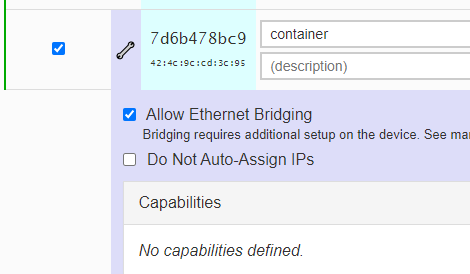
Once running, log into your ZeroTier interface and approve the new device. Click the wrench next to the name and select 'Allow Ethernet Bridging.'
2021-08-12 17:11:12 +01:00
2021-08-12 17:10:03 +01:00
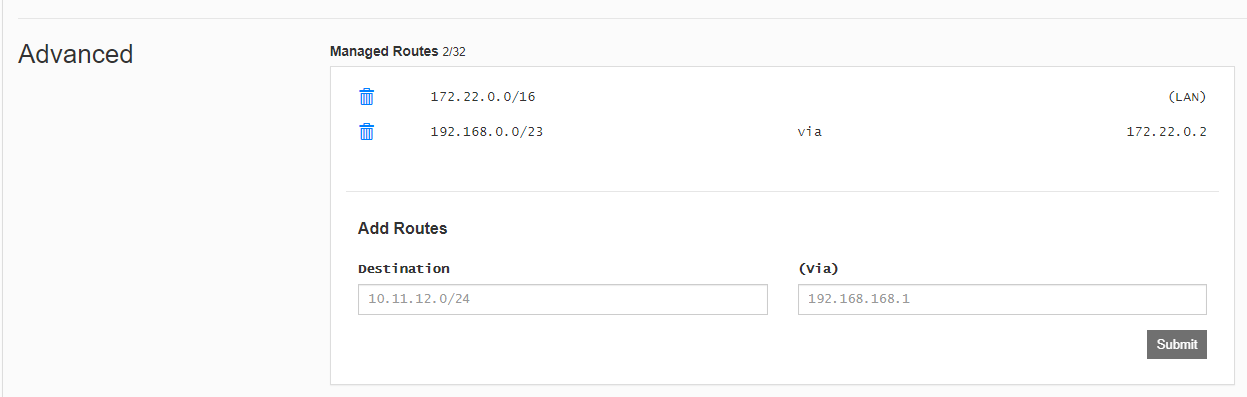
You also need to add a static route into ZeroTier so that the traffic is routed correctly. Add this a bit larger than normal because of [longest prefix matching ](https://en.wikipedia.org/wiki/Longest_prefix_match ).
2021-08-12 17:06:30 +01:00
2021-08-12 16:17:57 +01:00
2021-08-12 19:28:53 +01:00
### Persistent Storage
If you would like the container to retain the same ZeroTier client ID on reboot, attach a volume as per the below.
`docker run --privileged -e ZT_NETWORK=NETWORK_ID_HERE --volume zt1:/var/lib/zerotier-one/ zerotierbridge:latest`
2021-08-12 16:17:57 +01:00
### Caveat: Architecture
If you need to run this on a device with different architecture (a raspberry pi, for instance), then just edit line 3 of the Dockerfile.
If you were using a Raspberry Pi 4, you would change this to `ARCH=arm64` and the container will pull the correct ZeroTier installer.
## TODO
- Add docker-compose.yml
- Add kubernetes deployment YAML
